How to Make a Good Username | Create a Unique and Secure Username

TL;DR: Use a unique username for every account. Avoid personal information. Check availability across platforms before committing. For sensitive accounts, generate a random username with a password generator and store it in a password manager.
Usernames are the first layer of your online identity — and one of the most overlooked pieces of your security posture. Most people think carefully about their passwords but reuse the same username across dozens of platforms without a second thought.
This guide covers why unique usernames matter, how to create them for different contexts (social media, gaming, professional, anonymous), and more than 100 ready-to-use username ideas organized by style. Whether you're building a brand, protecting your privacy, or just looking for something clever to put in the username field, you'll find what you need here.
Table of Contents
Why You Need to Use Unique Usernames
Unique Usernames for Security
Reusing usernames is as risky as reusing passwords. Most people understand that weak passwords are a liability — but fewer realize that a consistent username creates a roadmap for attackers.
When criminals steal credentials from a data breach, they don't just try your username and password on one site. They run automated tools that test credentials across hundreds of services simultaneously — a technique known as credential stuffing. If your username is the same everywhere, attackers already know where to look.
The follow-on risk is spear-phishing: once an attacker knows your username on Instagram, they can send you a convincing "password reset" email that appears to come from Instagram. Many people — including those with regular security training — fall for these attacks when distracted or in a hurry.
A unique username for each account acts as a second password: it prevents attackers from mapping your entire digital footprint from a single breach.
What not to include in a secure username
| ❌ Avoid | ✅ Instead try |
|---|---|
| Your real name or initials (JohnSmith, JS1987) | Unrelated word combinations (CobaltFernleaf) |
| Date of birth or birth year (john1990, smith87) | Random numbers with no personal meaning (42, 99) |
| Phone number, address, or email prefix | Invented or mismatched words (NebulaWaffle) |
| Passwords, PINs, or security answers | Randomly generated strings for sensitive accounts |
| Words like "admin", "password", or "login" | Neutral words that reveal nothing about your identity |
The Other Reasons People Create Unique Usernames
Unique Usernames for Anonymity
Anonymity and security go hand-in-hand. Many professionals maintain personal social media accounts they don't want discoverable by clients, employers, or recruiters. Using an unrelated username across personal platforms — one that shares nothing with your professional identity — gives you that separation. In a world where oversharing is the default, a unique username is often your best first-line defense for privacy.
Unique Usernames for Fame and Popularity
On Instagram, TikTok, and YouTube, your username is often the first impression you make. Clever, catchy, or cryptic handles generate curiosity and drive profile visits. French Connection UK's @FCUK is a famous example: the double-take factor alone earned it media coverage far beyond what a conventional username would have.
Many creators use unexpected word pairings, stylized spellings, or obscure references to craft handles that feel memorable and intentional. A strong username is a small piece of branding that works constantly in your favor.
Unique Usernames for Humor
A funny username is a simple way to inject personality into your online presence. Handles like @PickledElephantTusk or @BaguetteWizard get attention and immediately signal creativity. These thrive on Reddit, gaming forums, and X (formerly Twitter) — anywhere lighthearted interaction is part of the culture. Just note: if privacy is a priority, avoid usernames so distinctive they become searchable identifiers.
Unique Usernames for Business Branding
For businesses, a consistent username across platforms is part of brand identity — it makes you findable and signals credibility. Before registering a business name, check that the username is available on every platform you plan to use and secure it before launch. Tools like Namechk (namechk.com) let you check availability across dozens of platforms at once.
One important balance to keep in mind: public-facing business accounts should be consistent and discoverable. But internal accounts — email marketing tools, project management software, financial platforms — should use obscure, unique credentials to protect against targeted attacks.
150+ Unique Username Ideas by Category
Here's a curated list of username ideas organized by style. Use them directly, or treat them as a starting point to build your own.
Funny Username Ideas
- SirCringesAlot
- TacoPhilosopher
- GalacticToaster
- QuantumNoodleArms
- DrSlipperyFish
- ProfessorChaos99
- WaffleOverlord
- CaptainObvious42
- BiscuitCommandant
- GoblinOnABike
- PoliteVolcano
- MoustacheOfDoom
- NoodleArmedBandit
- CaffeineDependent
- TheRealMayonnaise
- SalmonDaddy99
- SneezyMcFly
- PickledElephantTusk
- BaguetteWizard
- PandaDisco1995
Aesthetic and Soft Username Ideas
- MorningMistGlow
- VelvetPetalDream
- SilverMoonRose
- CloudAndCinnamon
- LavenderEchoes
- SoftCandlelight
- WillowWhisper
- SunriseSerenade
- PorcelainSkies
- DewdropReverie
- PastelDuskVibes
- CottageRoseGlow
- QuietMeadowHaze
- PeachBlossomSky
- LinenAndHoney
- SageAndCeladon
- TwilightPorcelain
- FrostbloomPetal
- GoldenHourMuse
- AzureWhisperWing
Dark and Edgy Username Ideas
- VoidWalkerX
- PhantomCircuit
- EclipseRenegade
- NightShardGhost
- CrimsonSilence7
- ObsidianWrath
- ShatteredEcho13
- AbyssalKnight
- GlitchSpecter
- TwilightSerpent
- IronVenomCrow
- ShadowfallBane
- VenomousNebula
- NullPointerGhost
- StormcrowDecay
Gaming and Gamertag Username Ideas
- NeonRifleX
- QuantumSniper99
- VaultRaider77
- SteelFoxGaming
- InfiniteRespawn
- GhostlagZero
- OmegaCritHit
- SonicBladeXX
- NovaMechForce
- TurboFrag91
- HyperLockDrift
- PixelBerserker
- StarForgeAlpha
- ZeroGravKill
- BinaryBrawler42
- TitanDropPod
- ChromeAssassin
- LegacyLurker
- FrostbiteTank
- ApexPhantomX
Instagram and Social Media Username Ideas
- TheGoldenLens
- SolsticeVibes
- SunlitMoments
- WanderlustJournal
- TheCuriousShot
- GlowAndTell
- LivingInFrames
- SilhouetteSeek
- CapturedByLuna
- DuskAndDawn
- BeamOfHoney
- SaltwaterSunrise
- UrbanMosaicCo
- FernAndFilter
- TheRovingLight
- SunflowerFrames
- MorningGoldPhoto
- DreamyShutter
- CasualCelestial
- NorthernLightsCo
Professional Username Ideas
- johnsmith_acme
- j.r.smith
- jsmith_design
- sarah.j.consulting
- the_real_johnsmith
- codewith_john
- jrsmith_design
- jsmith_designer
- smithjohn_ux
- john_smith_dev
- official_jsmith
- j.smith.acme
- johnsmithcreative
- jsmith86
- john.r.smith
Anonymous and Security-First Username Ideas
These are built with the "unrelated category mix" method described below. They contain no personal information and are difficult to trace back to you.
- IdahoPufferfish13
- NorwayFernleaf55
- VerdigrisStork42
- MossyAnvilNorth
- TurbineOakleaf7
- MarigoldCobalt91
- PlatinumTrout66
- VolcanoQuartz14
- SeleniumBirch88
- CeladonVortex43
- WillowCipherX
- NebulaCoral55
- ObsidianMaple17
- OpaqueHarbor99
- TerracottaFjord22
How to Create Unique Usernames
Not finding what you need in the list above? Here are five methods to generate your own — from creative DIY to fully automated.
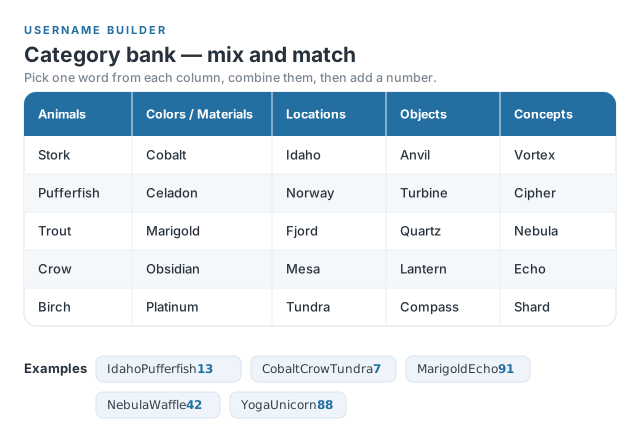
1. Combine Unrelated Categories
This is the most reliable DIY method, and it works for any style goal: funny, anonymous, or interest-themed. Pick two or three words from completely unrelated categories, then add a number that has no personal significance to you.
Step-by-step:
- Choose two or three unrelated categories — animals, colors, locations, objects, or abstract concepts all work well.
- Pick one word from each category.
- Add a number (not your birth year or anything personally identifiable).
2. Create a Professional Username
For LinkedIn, work tools, or any account where you want to be findable and credible, keep it clean and recognizable:
- Include your company name:
johnsmith_acmeorj.smith.acme - Add your middle initial: If your name is common,
john.r.smithorjrsmith_designcreates a unique identifier without adding noise. - Reference your role:
jsmith_designerorcodewith_johnsignals expertise at a glance. - Use a modifier if the name is taken:
the_real_johnsmith,official_johnsmith, orjohn_smith_86.
Professional usernames should be easy to associate with you or your work — memorable, but not clever for its own sake.
3. Use a Username Generator
If brainstorming isn't your thing, username generators remove the friction entirely. Some useful options:
- SpinXO (spinxo.com): Generates usernames from your interests, keywords, or personality type. Now includes AI-powered generation and platform-specific filters for gaming, Instagram, and more. Trusted by over 10 million users.
- Namechk (namechk.com): Primarily a cross-platform availability checker. Type in a username and see immediately where it's already taken before you commit.
- Jimpix (jimpix.co.uk): Combines random word pairs to generate creative, non-obvious usernames. Good for anonymous or privacy-focused accounts.
4. Use AI to Generate Custom Username Ideas
AI tools can generate personalized username ideas quickly, and they're good at respecting constraints you give them: no personal info, specific theme, platform character limits. Try a prompt like this in any AI assistant:
"Give me 20 unique username ideas that combine [hobby or interest] and [color or material], without using my real name or birth year. Keep them under 20 characters."
You can layer in style constraints ("make them sound mysterious" or "keep them professional") and iterate until something clicks. This works especially well for building a social media persona or finding a handle that matches a specific aesthetic.
5. Use a Password Generator for Maximum Security
For accounts where anonymity is the priority — financial apps, productivity tools, anything sensitive — a randomly generated string is the most secure username you can create. Password generators produce completely random character sequences with no personal link whatsoever.
How to do it:
- Open TeamPassword's free password generator.
- Deselect symbols if the platform doesn't allow them in usernames (keep them if it does).
- Generate at least 12 characters. Shorten if the platform requires it.
- Copy and paste directly into the username field.
Example generated username: ZXW48TyqPl9r
The trade-off is memorability: you won't remember this username without storing it somewhere. That's exactly what a password manager is for — store it alongside the password and you only need to remember one master credential.
Username Style by Platform
Different platforms reward different styles. Use this as a quick reference before you register:
| Platform | Recommended style | Example |
|---|---|---|
| Real name or name + role / company | jsmith_design, john.r.smith | |
| Instagram / TikTok | Short, memorable, creative or aesthetic | SolsticeVibes, TheGoldenLens |
| YouTube | Channel-name style, reflects your niche | MorningGoldPhoto, CodeWithJohn |
| Anonymous, humorous, or topic-themed | WaffleOverlord, PoliteVolcano | |
| Gaming (Xbox, Steam, etc.) | Punchy gamertag style | ApexPhantomX, FrostbiteTank |
| Financial / productivity apps | Randomly generated — no personal info | ZXW48TyqPl9r, CeladonVortex43 |
How to Check Username Availability
Found a username you like? Check it before you commit. Here's a simple workflow:
- Go to Namechk (namechk.com) and type in your candidate username. It checks availability across dozens of social platforms simultaneously.
- Verify directly on any platform Namechk doesn't cover — availability tools sometimes lag on newer or niche services.
- Run a quick Google search on the username to see if it's already associated with a public profile you'd rather not be confused with.
- If your first choice is taken, apply a variation: add a number, prepend "the_" or "official_", or adjust the spelling slightly.
How to Manage All Your Unique Usernames
Here's the practical problem: if you're using a truly unique username for every account, you'll quickly have dozens of credentials you can't memorize. This is where a password manager earns its place.
Usernames and passwords are the keys to your individual and company accounts. Most companies have hundreds of accounts requiring daily authentication, with team members often sharing access to social media tools, research platforms, marketing software, and more.
Sharing credentials over email, Slack, or spreadsheets exposes your company to significant risk — and in some jurisdictions, it's a compliance violation.
A password manager stores your usernames and passwords in an encrypted vault. You remember one master password; every unique credential is one click away.
TeamPassword: Built for Teams
TeamPassword makes secure credential sharing practical at team scale.
- Affordable: Plans start at just $2.41/user/month — no paying for features you don't need.
- Secure: TeamPassword is an accredited secure hosting provider using AES-256 encryption, the same standard trusted by government agencies worldwide.
- Efficient: Share and revoke access with a single click. Create strong passwords instantly with the built-in password generator.
- Scalable: Start with as few as three users and grow your plan as your team expands.
- Flexible: Access credentials from the web, mobile apps, or browser extensions for Chrome, Firefox, and Edge.
Sharing Access With Groups
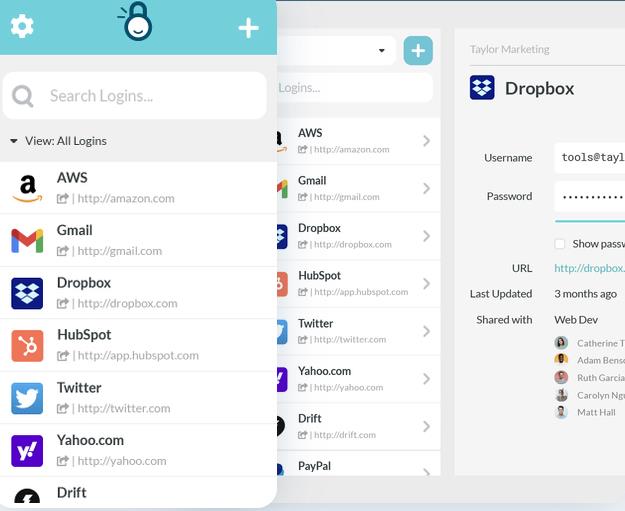
Create groups in TeamPassword to share access to specific accounts with the right people. When a contractor finishes a project or an employee leaves, remove them from the group — no password resets required across every platform. Agencies working with multiple clients only need one TeamPassword account, with unlimited groups on all plans.
Activity Logging
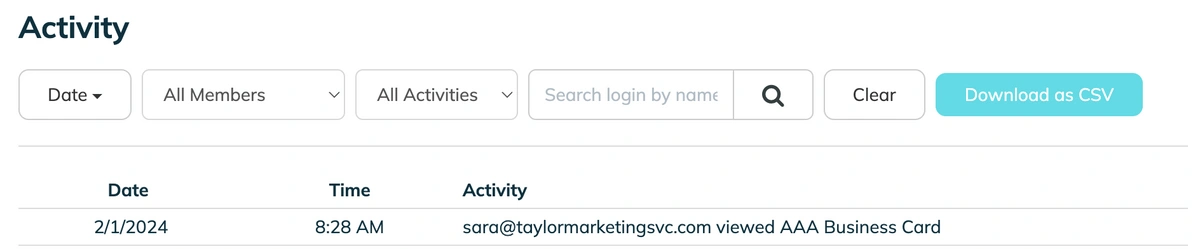
TeamPassword's activity log tracks every login, password change, and credential share. Set up email notifications for sensitive accounts or specific events — like when a new user is added or a password is updated.
Two-Factor Authentication
Enabling 2FA on your TeamPassword account means that even if an attacker obtains a username and password, they still can't get in without the employee's device. 2FA can be enforced organization-wide by any Owner or Admin.
TeamPassword supports Authy, Google Authenticator, Microsoft Authenticator, and any standard TOTP app. For a deeper look at how different authentication methods compare, see the difference between 2FA and MFA.
Frequently Asked Questions
What makes a good unique username?
A good unique username serves its purpose without exposing personal information. For public-facing accounts, it should be memorable and aligned with your platform and persona. For sensitive or private accounts, it should be random enough that no one can guess or trace it. In all cases, it should be different from your username on every other platform.
Can I use the same username on multiple sites?
You can, but you shouldn't — especially for accounts that hold sensitive information. Reusing usernames makes credential stuffing attacks significantly easier: if one site is breached and your username is exposed, attackers already know where else to look. At minimum, use distinct usernames across these five buckets: financial accounts, email, social media, work tools, and gaming.
How do I check if a username is taken?
Namechk (namechk.com) checks availability across dozens of platforms simultaneously. For any platform not covered, check the username directly in the platform's sign-up form. It's also worth doing a quick Google search to see if the username already has an existing public footprint you'd rather not inherit.
Should I use my real name as a username?
It depends on context. For professional platforms like LinkedIn, your real name or a close variant is usually the right call — it makes you findable and credible. For personal social media, gaming, or any account you want to keep private, avoid your real name entirely. For sensitive accounts like banking or productivity tools, a randomly generated username provides the strongest protection.
What usernames should I avoid for security?
Avoid anything that links back to your real identity: your name, birthday, phone number, address, or email prefix. Also avoid words like "admin", "password", or "login" — these are commonly targeted in brute-force attacks. The goal is a username that reveals nothing about who you are or where else you have accounts.
How often should I change my username?
Unlike passwords, you generally don't need to rotate usernames on a schedule. Most platforms don't make username changes easy anyway. The better approach is to start with a strong, unique username and only change it if you have reason to believe it's been compromised or linked to your identity in an unintended way.
Protect Every Username and Password With TeamPassword
Creating unique usernames for every account is only half the battle. You also need a secure place to store them. TeamPassword helps teams generate, organize, and share credentials without the security risks of spreadsheets, emails, or chat messages.
- Built-in Password Generator: Create strong, random usernames and passwords instantly, directly inside the app.
- Unlimited Records and Groups: Store all your unique credentials and organize them by team, project, or client with no limits.
- Enforceable 2FA: Require two-factor authentication across your entire organization to protect every account, even if a username gets exposed.
- Activity Logs: A full audit trail of who accessed what and when — useful for security reviews and compliance.
Plans start at just $2.41 per user per month. Start your free 14-day trial today →
Posts Recomendados
The 5 Best Password Managers for Nonprofits (2026 Review)
Nonprofits have unique needs in software, from lower budgets to less tech-savvy staff or no dedicated IT staff. ...
Top 10 cybersecurity threats for nonprofits (and how to prevent them)
Here’s what you need to know about cybersecurity threats for nonprofits, the top risks they face, and practical ...
Cybersecurity for Nonprofits: Keeping Your Nonprofit Secure
Cybersecurity is critical for all organizations, including nonprofits. Learn more in this guide about cybersecurity for nonprofits.
Fortaleça a segurança das suas senhas
O melhor software para gerar e gerenciar suas senhas corretamente.